Moto Rider 3D Game: First-Person Open-World Motorcycle Riding
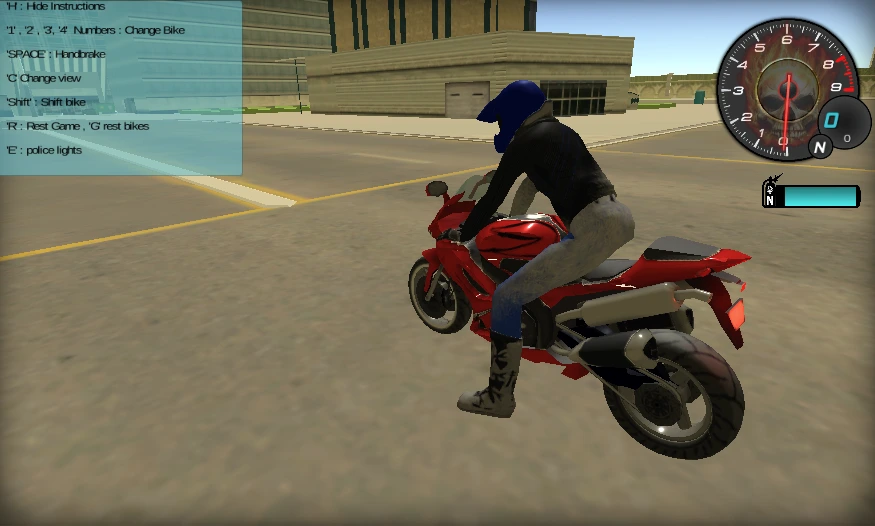
Developed by Faramel Games and released in January 2018, Moto Rider 3D is a browser-based motorcycle simulator built around freedom of movement. Unlike traditional racers that focus solely on the finish line, the Moto Rider 3D game is a celebration of the open road. It offers players a vast, stress-free 3D world where exploration replaces the pressure of competition. Built on the Unity engine and optimized for seamless browser play, it delivers a smooth riding experience centered on speed, camera control, and open-map discovery.
The Soul of the Open Road: Why Moto Rider 3D is a Simulator Favorite
The true magic of the Moto Rider 3D game lies in its commitment to player freedom. Whether you're looking for a "meditative" ride through the suburbs at sunset or a high-speed dash through a bustling metropolis, this game provides the perfect sandbox. It's often described by the community as the "best way to unwind," offering a rare balance between relaxation and extreme speed.
- Immersive First-Person Perspective: The iconic "helmet view" isn't just a visual choice; it fundamentally changes your relationship with the road. When you're "threading the needle" between two semi-trucks at 150 km/h, the proximity and the roar of the engine—recorded from real-life motorbikes—create a simulation-lite experience that feels authentic.
- Dynamic 3D Environments: From the winding hillside roads that test your lean angles to the grid-like streets of the Big City, each of the four maps offers unique landmarks and hidden areas to discover.
- Nitro-Burst Adrenaline: When you hit the Shift key, the world blurs. The nitro system in Moto Rider 3D is designed to provide an explosive surge of speed, turning a casual cruise into a heart-pounding dash through traffic.
Choose Your Ride in Moto Rider 3D
The Moto Rider 3D game features four different motorcycles, each offering a slightly different feel as you move through the city, hills, and open roads:
1. A Fast Road Bike
Some bikes feel more comfortable at high speed on long, open stretches of road. They are a good fit for players who enjoy using nitro and cruising through traffic with minimal slowdown.
2. The Police-Themed Bike
One of the most memorable options is the police-themed motorcycle. It stands out visually and fits the city setting especially well when you want to explore busy streets from a different angle.
3. A More Responsive Option
Some motorcycles feel lighter and easier to correct when roads tighten up. That makes them useful for hillside routes, quick turns, and moments when you want more control than raw speed.
4. A Balanced All-Rounder
If you prefer a relaxed ride, the more balanced bikes are a comfortable choice for free exploration. They work well when you want to enjoy the map, switch camera views, and practice basic control without rushing.
Practical Tips for Moto Rider 3D
To get more out of the open road, it helps to understand how the controls and camera work together. Here are a few practical ways to make the ride smoother:
1. The Art of the "Near Miss"
At higher speeds, passing close to traffic makes the ride feel much more intense. When you move through busy lanes without clipping nearby vehicles, the game rewards that confident control and keeps the momentum of your run alive.
2. Mid-Air Stunt Mastery
The world is your playground. Use the ramps scattered throughout the city and desert maps to launch into the air. While airborne, use the WASD keys to perform flips and rotations. Landing cleanly on both wheels helps you keep control and continue the ride without awkward recovery.
3. Tactical Handbrake Usage
Don't just rely on standard braking. Use the Space Bar (handbrake) for controlled turns and sharp drifts. This is particularly useful in the Big City map, where tighter corners and sudden adjustments demand more than simple steering.
4. Perspective Alignment
While the first-person view is the most immersive, it can also help with alignment. Use the helmet cam to line up your front tire with narrow urban ramps or to better judge spacing when weaving through heavy traffic.
Moto Rider 3D Unblocked: Play Free Online Anywhere
One of the defining features of Moto Rider 3D is its accessibility. As an HTML5 browser game, it loads quickly, requires no downloads, and runs well on many everyday devices, including Chromebooks. That makes it easy to jump in for a short session whenever you want a quick ride through its 3D maps.
Whether you want to test your reactions in traffic, practice jumps on ramps, or simply enjoy a peaceful ride through a virtual city, Moto Rider 3D offers a flexible mix of freedom, speed, and easy pick-up-and-play appeal.